
<!DOCTYPE html>
<html>
<head>
<meta charset="UTF-8">
<title>Insert title here</title>

<script src="https://code.jquery.com/jquery-3.3.1.min.js"></script>
<link rel="stylesheet"
    href="http://code.jquery.com/ui/1.12.1/themes/base/jquery-ui.css"
    type="text/css" />
<script src="http://code.jquery.com/ui/1.12.1/jquery-ui.min.js"></script>

</head>
<body>

    <h1>JQuery 달력</h1>
    <h2>date Picker</h2>

    <p>
        선택일:<input type="text" id="date">
    </p>

    <p>
        text박스를 클릭하면, <strong>캘린더</strong>가 표시됩니다
    </p>

    <br>
    년도: <p id="year"></p>
    월:
    <p id="month"></p>
    일:
    <p id="day"></p>
    요일:
    <p id="mydate"></p>

    <script type="text/javascript">
        $(function() {
            $("#date").datepicker(
                    {
                        dateFormat : "yy/mm/dd",
                        dayNamesMin : [ "일", "월", "화", "수", "목", "금", "토" ],
                        monthNames : [ "1월", "2월", "3월", "4월", "5월", "6월",
                                "7월", "8월", "9월", "10월", "11월", "12월" ],
                        onSelect : function(day) {
                            alert(day + " 선택되었습니다");

                            var arrDate = day.split("/");
                            var year = arrDate[0];
                            var month = arrDate[1];
                            var day = arrDate[2];

                            $("#year").text(year);
                            $("#month").text(month);
                            $("#day").text(day);

                            var date = new Date($("#date").datepicker({
                                dateFormat : "yy/mm/dd"
                            }).val());
                            alert("date: " + date.getDay()); // 요일
                            alert("date: " + date.getDate()); // 일자

                            var week = new Array("일", "월", "화", "수", "목", "금",
                                    "토");
                            $("#mydate").text(week[date.getDay()]);
                        }
                    });
        });
    </script>

</body>
</html>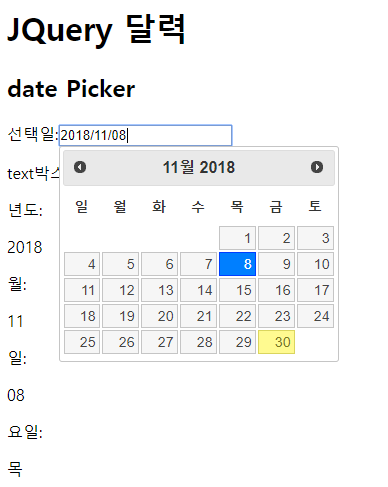
 Query 기초 (동적 테이블 (데이터 추가 / 삭제), integrateTable(...
 jQuery 기초 (Postcodify - 도로명주소 우편번호 검색 프로그램 (...
